TempTale® Ultra Fit: USB PDF Temperature Data Logger for Export Shipments
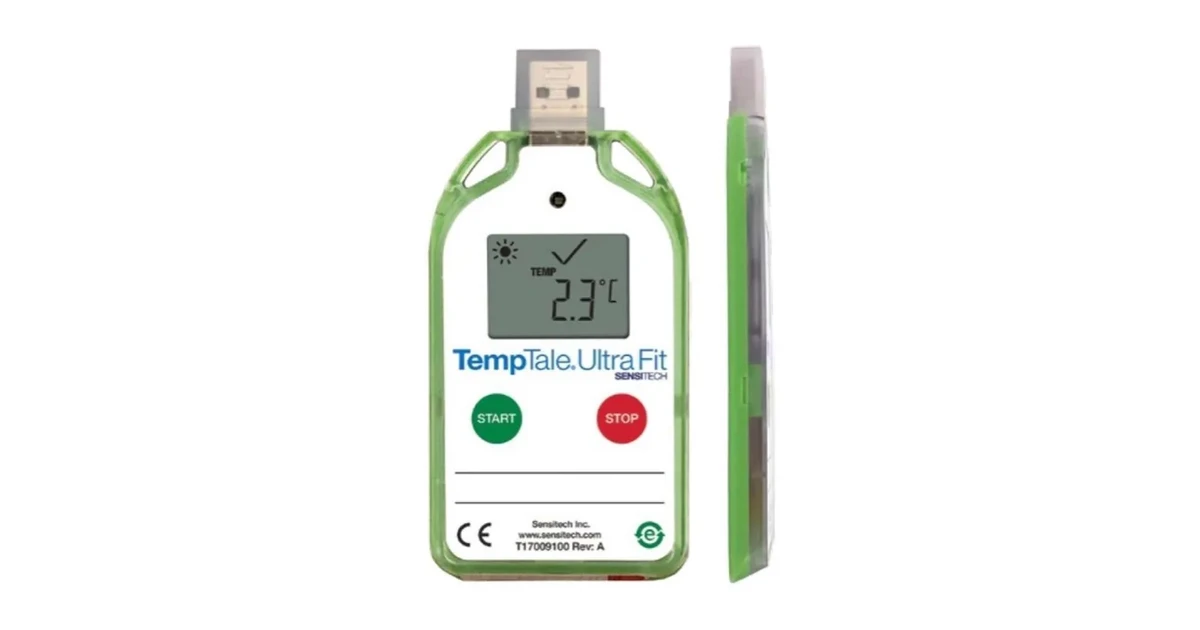
The **TempTale® Ultra Fit** is a single-use USB temperature data logger for export shipments where you do not know what software the receiver has. You start it, place it on the shipment, and at destination the receiver plugs it into a PC and a secure PDF report opens. A large LCD shows OK or alarm status, so the dock team can accept or reject the load before anything is downloaded. This guide covers the [TempTale® Ultra Fit](https://royalkana.com/product/temptale-ultra-fit) specs, how it works, where it fits, how it compares with other loggers we stock, and how to order it from Dubai.
TempTale® Ultra Fit specifications
These figures come from the Sensitech TempTale® Ultra Fit datasheet:
- **Recording option:** single use
- **Measurement range:** -30°C to +70°C (-22°F to +158°F)
- **Accuracy:** ±0.5°C from -10°C to +45°C; ±1.0°C from -30°C to -10°C and from +45°C to +70°C
- **Resolution:** 0.1° over the full range
- **Memory:** 16,000 data points in non-volatile flash, up to 180 days of data
- **Sampling interval:** programmable from 30 seconds to 15 minutes
- **Start-up delay:** 0 minutes to 24 hours, with manual push-button or automatic launch
- **Alarms:** programmable high and low limits, with single-event or cumulative alarm delay
- **Battery:** 6-month operating life, non-replaceable 3.0 V lithium
- **Housing:** IP64 water resistant with the protective cap on the USB connector
- **Size and weight:** 108 × 53 × 7 mm, about 40 g
- **Interface:** USB 2.0 A-type plug; Windows 8.1 or higher and Adobe Reader 9.0 or higher
- **Certifications:** CE, RTCA DO-160G and RoHS compliant; response time tested to USP <1118> and EN 12830; 3-point NIST® traceable Certificate of Calibration and a validation manual
Request the datasheet and a quote on the [TempTale® Ultra Fit product page](https://royalkana.com/product/temptale-ultra-fit).
Why a USB/PDF logger suits export shipments
On many export lanes the receiver is a distributor, importer or warehouse that does not run TempTale® Manager or any logger software. A logger that needs a reader, a cradle or an app slows down the release, or the data never gets downloaded at all.
The Ultra Fit avoids that problem:
- **No software at destination:** the USB plug creates the secure PDF automatically, and any Windows PC with a PDF reader can open it
- **Five PDF languages:** the report can be generated in one of five languages for receivers abroad
- **LCD at the dock:** started, running and stopped status, OK or alarm, trip summary (average, minimum, maximum), the current temperature and marked events
- **Bright colour:** the housing is easy to spot among cartons and pallets, so the logger is found and read
For the shipper, the data can be kept in ColdStream® cloud, managed in TempTale® Manager Desktop, or stored as PDFs in your own quality records.
How to use the TempTale® Ultra Fit
- **Set your profile:** agree the high and low alarm limits, alarm delay, sampling interval and start delay before the loggers ship to you
- **Start it:** press the start button, or use the automatic launch option, and let the start delay cover packing time
- **Place it with the product:** put it on or inside the shipment, near the product rather than against a wall or cooling unit
- **Check at arrival:** the receiver reads OK or alarm on the LCD and decides at the dock
- **Download:** plug it into a PC, file the PDF with the delivery record, and share it with the shipper
Alarm settings for food and perishables
The Ultra Fit supports a high and a low limit. Each alarm delay can be **single-event**, which times one continuous excursion, or **cumulative**, which adds up all the time spent out of range across the trip. A delay stops a short door opening or a quick transfer from raising a false alarm.
For chilled food, the limits usually follow your HACCP plan, for example a high alarm above +5°C. For frozen goods, set the high limit at the warmest temperature your specification allows. Our guide to [HACCP temperature monitoring for food safety in the GCC](https://royalkana.com/blog/haccp-temperature-monitoring-food-safety-gcc) explains how inspectors read this kind of record. For produce where humidity also matters, see [temperature and humidity monitoring for fresh produce in transit](https://royalkana.com/blog/temperature-humidity-monitoring-fresh-produce-transit).
Where the TempTale® Ultra Fit fits
- **Food exports by sea and air** from Jebel Ali and Dubai airports where the importer has no logger software
- **Fresh produce, meat, seafood and dairy** on reefer containers and refrigerated trucks across the GCC
- **Industrial and temperature-sensitive goods** that need a simple, documented temperature record
- **Long trips:** up to 180 days of data covers slow sea freight and storage at destination
- **Inside passive shippers** such as [TempLink Pro](https://royalkana.com/product/templink-pro) when the pack-out needs a single-use USB/PDF monitor
TempTale® Ultra Fit vs other loggers we stock
- **Simplest validated USB/PDF export logger with LCD, high/low alarms:** the [TempTale® Ultra Fit](https://royalkana.com/product/temptale-ultra-fit)
- **Life Sciences lanes needing up to six alarms including MKT, FDA 21 CFR Part 11 / EC Annex 11 workflows:** the [TempTale® Ultra Single Use](https://royalkana.com/product/temptale-ultra-single-use), or the reusable [TempTale® Ultra Multi Use](https://royalkana.com/product/temptale-ultra-multi-use)
- **Temperature and humidity in one device:** the [TempTale® Ultra Humidity](https://royalkana.com/product/temptale-ultra-humidity)
- **Read the temperature without opening the box:** the [TempTale® Ultra Probe](https://royalkana.com/product/temptale-ultra-probe)
- **Cost-sensitive disposable PDF logger for high-volume food and medicine lanes:** the [TempChrome E-10](https://royalkana.com/product/tempchrome-e10)
For a wider comparison, read [TempTale® vs TempChrome: which data logger do you need](https://royalkana.com/blog/temptale-vs-tempchrome-which-data-logger) and [single-use vs multi-use temperature data loggers](https://royalkana.com/blog/single-use-vs-multi-use-temperature-data-loggers-pharma-export-dubai). For what the calibration certificate proves, see [NIST-traceable calibration certificates](https://royalkana.com/blog/data-logger-calibration-nist-traceable-certificates).
Tips before you ship
- Keep unused loggers at room temperature until you start them
- Match the start delay to your packing time so loading is not recorded as an excursion
- Write the logger serial number on the delivery note so the PDF matches the consignment
- Keep the USB cap on during the trip to keep the IP64 rating
Ordering the TempTale® Ultra Fit from Dubai
Royal Kana General Trading LLC has been selling Sensitech monitoring products in the Middle East for 8 years. We hold TempTale® stock in Dubai and ship to the UAE, Saudi Arabia and the wider GCC, and on export lanes to India, Türkiye, Europe and the US. Many of our clients have worked with us for 8 years or more. Our team takes calls 24/7, and inside the UAE we can send a driver for urgent orders. Tell us your product, lane, trip length, alarm limits and monthly volume, and we will quote the right configuration.
Request a quote on the [TempTale® Ultra Fit product page](https://royalkana.com/product/temptale-ultra-fit), or browse all [temperature data loggers](https://royalkana.com/category/data-logger).
Need help with your cold chain setup? Contact Royal Kana.